Keywords AI
If you're building AI agents or working with LLMs in production, you've probably wondered: "How do I know when something goes wrong?"
The answer is webhooks and alerts.
What are webhooks for AI agents?
Think of webhooks as automated notifications that your AI system sends when something important happens.
Here's the simplest way to understand it: Webhooks let your apps talk to each other automatically.
When your AI agent finishes a task, hits an error, or exceeds a budget limit, a webhook can instantly notify another system.
What events look like in real AI agent systems
In most production AI setups, the most critical moments aren't user actions. They're internal events that happen behind the scenes.
Here are the events that matter most:
- Request failures - When a model request fails or times out
- Agent completions - When an agent run finishes its task
- Retry thresholds - When retries exceed acceptable limits
- Budget alerts - When token usage crosses cost thresholds
- Quality drops - When evaluation scores indicate problems
These moments are critical because they're often the earliest warning signs that something is about to break.
Why webhooks matter for AI agents
Here's how webhooks work at the most basic level: When something happens in your AI system, it sends a message (usually an HTTP POST request) to a URL you've specified.
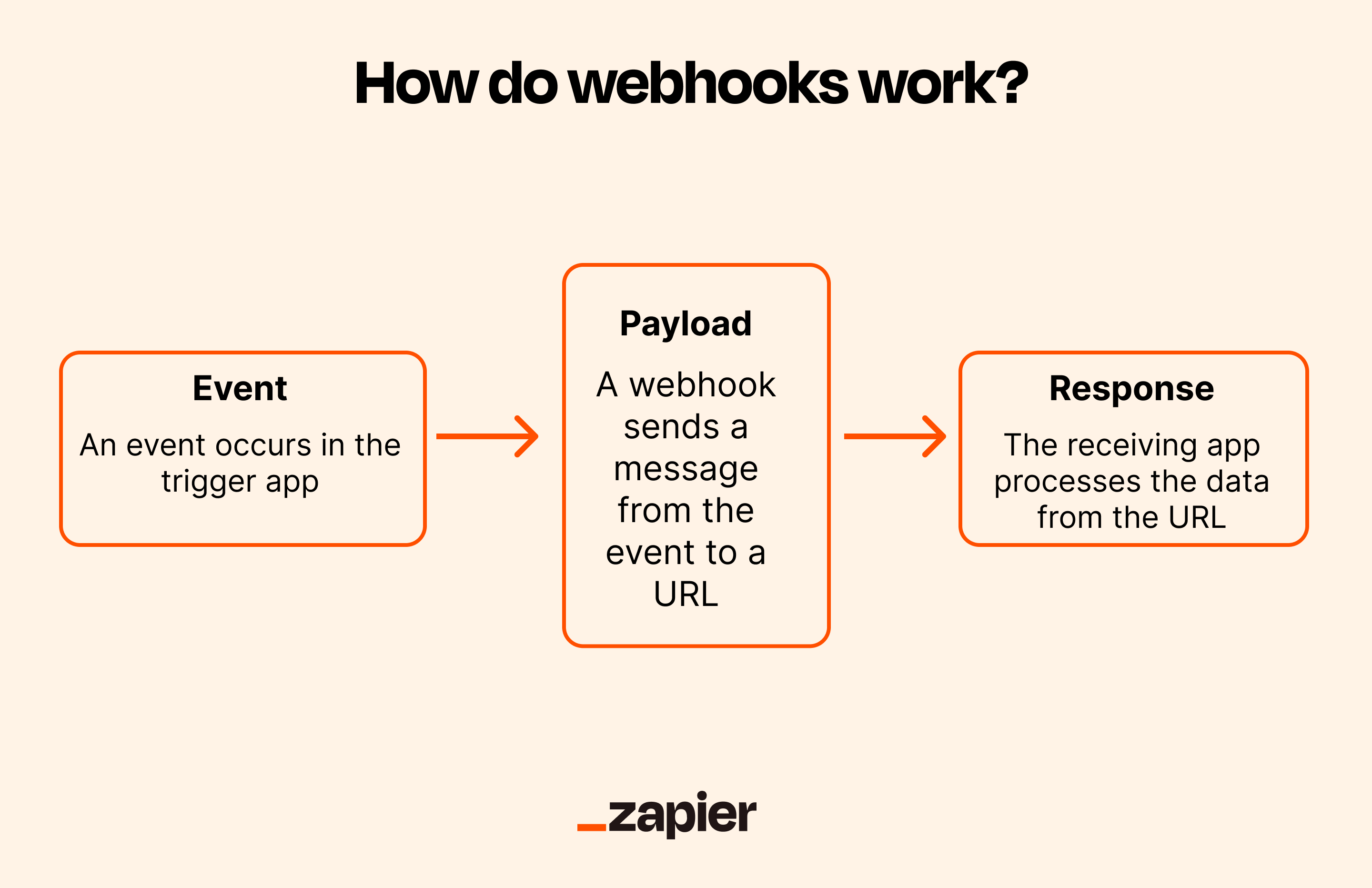
That destination could be:
- A monitoring service like Datadog or Prometheus
- An alerting channel like Slack, PagerDuty, or email
- A control system that can pause or adjust agent behavior
- A human-in-the-loop workflow that requires manual review
The key difference from traditional webhooks: With AI agents, you're not just passing data between apps. You're creating an early warning system that can intervene while the agent is still running.
Think about it: If your AI agent is burning through tokens because it's stuck in a loop, wouldn't you want to know right now instead of when you check your bill next month?
Common webhook-driven patterns for AI agents
Now that you understand what webhooks are, let's look at how teams actually use them in production AI systems. Here are the most common patterns.
1. Catch failures before they cascade
The problem: Your AI agent hits an error, retries endlessly, and makes dozens of expensive API calls before anyone notices.
The webhook solution: Set up a webhook that fires when:
- A request fails or times out
- Retries exceed a threshold (e.g., 3 attempts)
- An unexpected error occurs
When the webhook triggers, you can automatically:
- Send an alert to your on-call Slack channel
- Pause the agent to prevent further damage
- Trigger a manual review workflow
Real example: Instead of discovering in your monthly bill that an agent made 10,000 failed API calls over a weekend, a webhook alerts you after the first 5 failures. Your system automatically pauses the agent, and you fix the issue Monday morning.
The goal isn't just debugging. It's preventing silent failures from becoming expensive disasters.
2. Trigger downstream work when agents complete
The problem: You need to know the exact moment an AI agent finishes so you can start the next step. Constantly checking "Is it done yet?" wastes resources.
The webhook solution: When an agent completes its task, a webhook instantly notifies your system. Then you can:
- Write results to your database
- Notify users that their request is ready
- Start the next agent or workflow
- Run evaluation and quality checks
Real example: A customer uploads a document for AI analysis. Your agent processes it, and immediately upon completion, a webhook triggers:
- Saves the analysis to your database
- Sends the customer an email notification
- Starts an evaluation agent to check quality
- Logs the completion for analytics
No polling. No delays. Everything happens automatically, in sequence.
3. Enforce budgets and prevent cost overruns
The problem: LLM costs can spiral out of control. An agent stuck in a loop can burn through your monthly budget in hours.
The webhook solution: Set up webhooks that fire when usage crosses thresholds:
- Token usage exceeds daily limits
- Cost per request is abnormally high
- Latency indicates inefficient processing
When triggered, your system can:
- Pause the agent until you review what's happening
- Downgrade the model (e.g., switch from GPT-4 to GPT-3.5)
- Require human approval before continuing
- Alert finance team about potential overages
Real example: You set a webhook to trigger when token usage exceeds 1 million in a day. At 10 AM, usage hits the threshold. Your system:
- Sends an alert to your engineering Slack channel
- Automatically downgrades from to
gpt-5gpt-5-mini - Continues running at lower cost while you investigate
Without webhooks, you'd discover the problem when you get a $10,000 bill at month's end. With webhooks, you catch it in real-time and take action.
How alerts work with webhooks
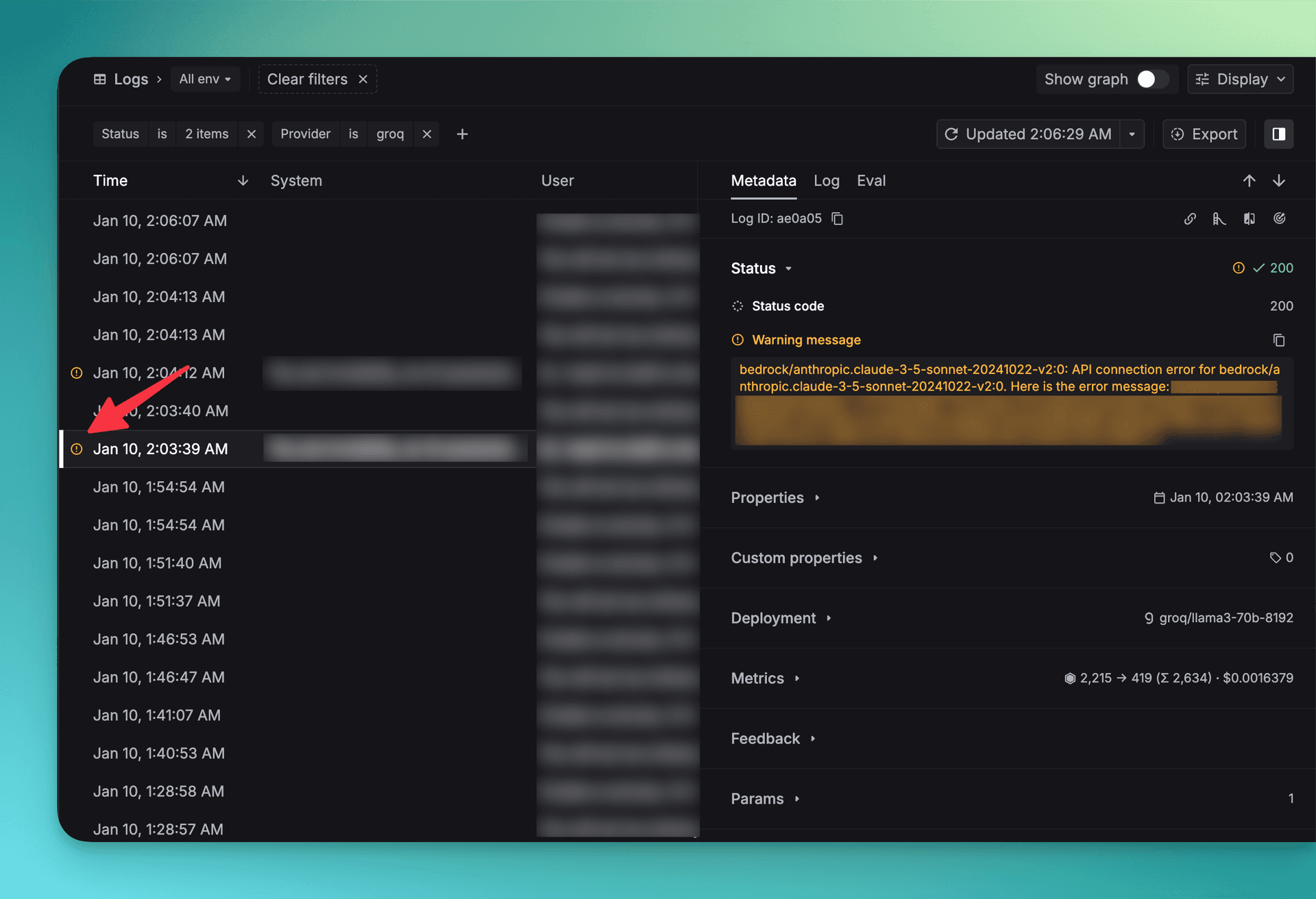
Here's a key distinction: Webhooks deliver events. Alerts decide who needs to know about them.
Think of it this way:
- Webhooks = The delivery mechanism (sending the data)
- Alerts = The subscription service (who gets notified)
Setting up alert subscriptions
The smart way to use alerts is to subscribe different people or systems to different event types:
| Event Type | Who Gets Alerted | Why |
|---|---|---|
| Critical failures | On-call engineers via PagerDuty | Needs immediate attention |
| Budget thresholds | Engineering + Finance via email | Important but not urgent |
| Quality drops | Product team via Slack | Needs investigation |
| Successful completions | Logging system only | No human action needed |
The golden rule of alerts
Not every webhook should trigger an alert. In fact, most shouldn't.
Here's how to decide:
- ✅ Alert humans for critical issues requiring immediate action
- ✅ Alert systems for events that trigger automation
- ❌ Don't alert for routine events that can be logged
By separating webhooks (the event data) from alerts (the notifications), you reduce noise while still catching problems fast. Your team stays informed without drowning in notifications.
How to set up webhooks for your AI system
Ready to implement this in your own system? Here's a step-by-step guide using Keywords AI as an example—a platform built specifically for production LLM applications.
Step 1: Create your webhook
First, you'll create a webhook endpoint that receives notifications when specific events occur.
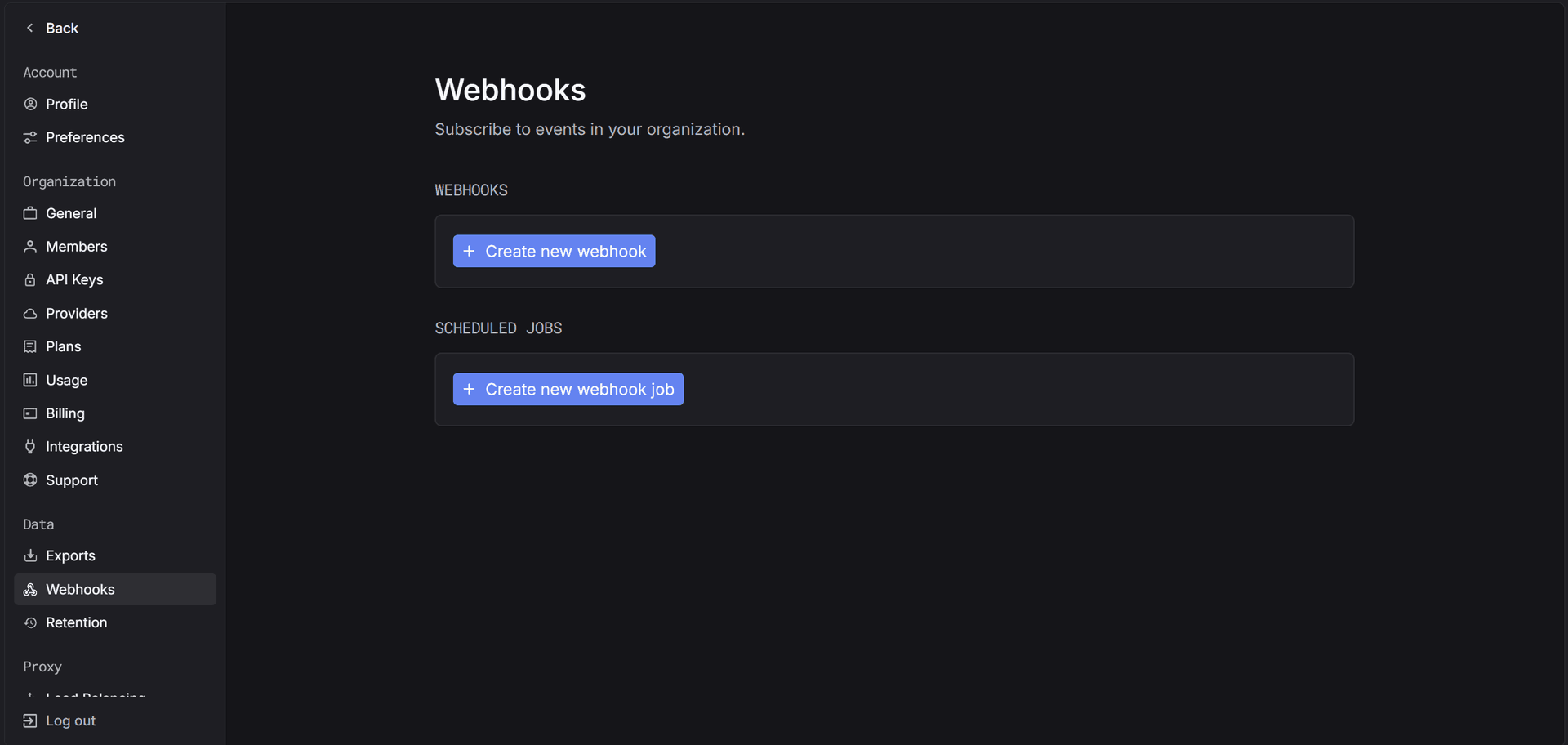
In the Keywords AI platform:
- Go to Settings > Webhooks
- Click Create Webhook
- Enter your webhook URL (where you want to receive notifications)
- Select which events should trigger the webhook:
- New request logs
- Failed requests
- Usage threshold exceeded
- Evaluation completed
Step 2: Secure your webhook
Security matters. You want to make sure webhook data is actually coming from your AI platform and not from a malicious source.
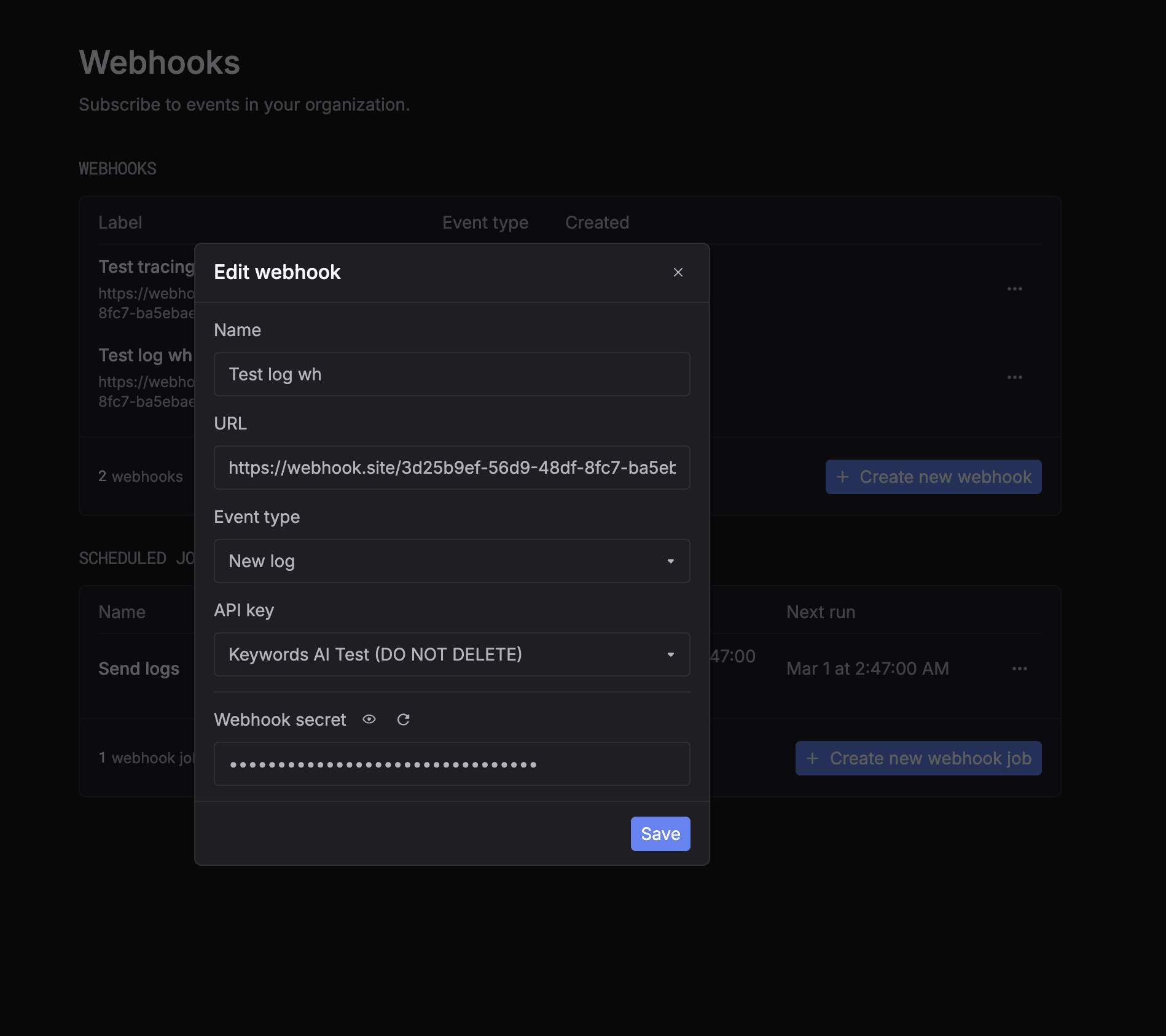
Keywords AI uses webhook secrets for verification:
- Copy your webhook secret from the platform
- Use it to verify incoming webhook requests
- Reject any requests that don't match
Here's example verification code:
python1import hmac 2import json 3 4secret_key = YOUR_WEBHOOK_SECRET 5signature = request.headers.get("x-keywordsai-signature") 6compare_signature = hmac.new( 7 secret_key.encode(), 8 msg=stringify_data.encode(), 9 digestmod="sha256" 10).hexdigest() 11 12if compare_signature != signature: 13 return Response({"message": "Unauthorized"}, status=401)
Step 3: Subscribe to alerts
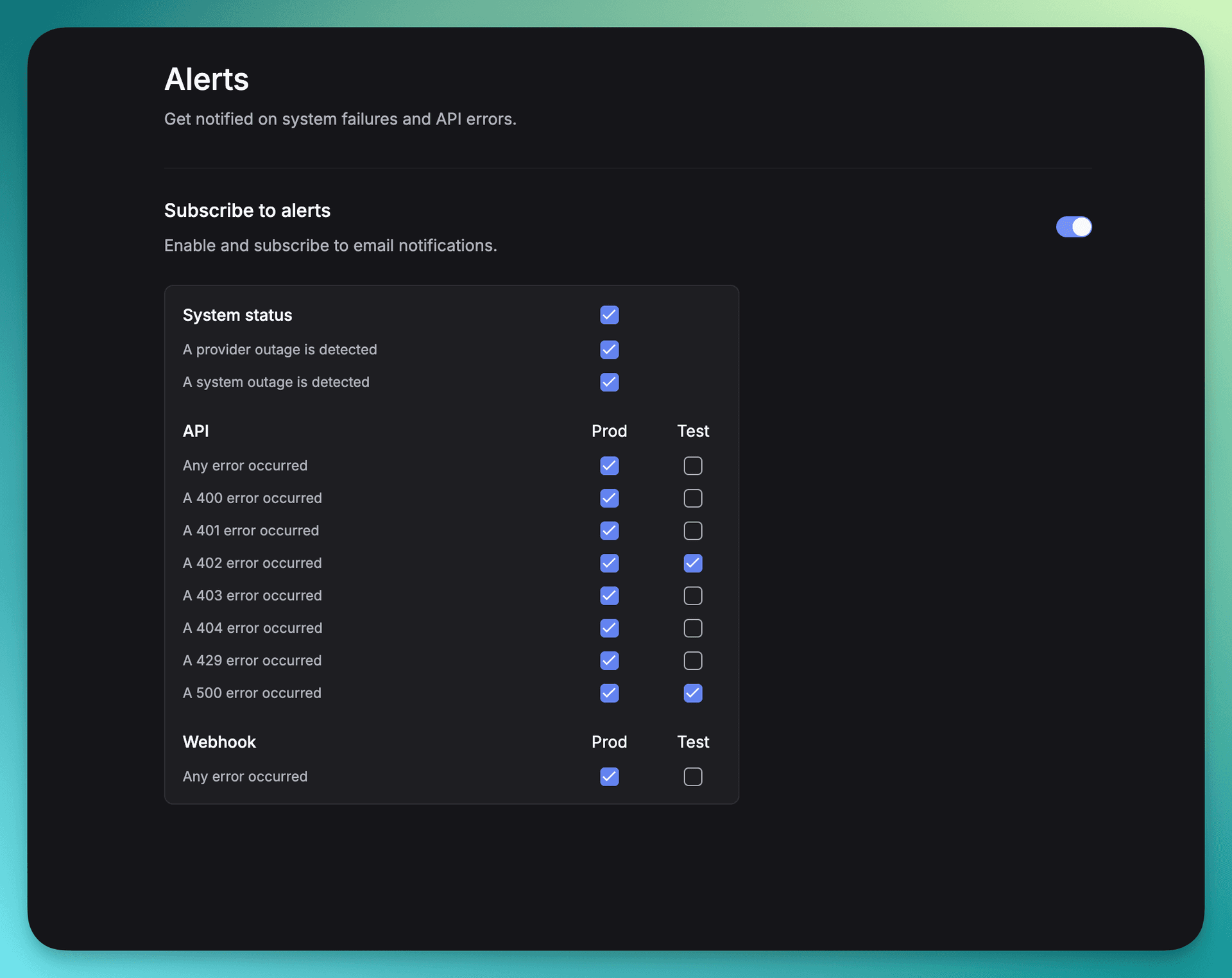
Now decide who should be notified about which events.
Set up alert subscriptions to:
- Send critical failures to your on-call team
- Route cost alerts to engineering + finance
- Keep routine events in logs only
This separation lets you:
- ✅ Route critical failures to humans who can act immediately
- ✅ Send non-critical events to automated systems
- ✅ Keep noisy routine events out of alert channels
Step 4: Test your setup
Before going live, test that everything works:
- Trigger a test webhook from your AI platform
- Verify your endpoint receives the data
- Check that alerts reach the right channels
- Confirm authentication is working properly
Real implementation example
Here's how a production team might set this up:
Webhook events configured:
- Request failures → Slack #incidents channel
- Daily usage exceeds $100 → Email to eng-leads@company.com
- Evaluation score < 0.7 → Slack #ai-quality channel
- Agent completion → Internal API for workflow triggers
Result: The team catches problems in minutes instead of days, saves thousands in wasted API calls, and maintains high quality without constant manual checking.
Learn more
Want to implement this in your system? Check out the complete documentation:
The key insight isn't about any specific API—it's about designing agent systems that emit signals intentionally instead of forcing you to dig through logs after problems happen.
Webhooks vs. polling: Which should you use?
If you're wondering whether to use webhooks or polling (regularly checking for updates), here's a simple comparison:
Polling (checking repeatedly)
❌ Wastes resources - Checks happen even when nothing has changed
❌ Adds latency - You only find out during the next check cycle
❌ Misses events - Events between checks can be lost
❌ Unpredictable with AI agents - You never know when they'll actually finish
When to use polling: When you're working with systems that don't support webhooks, or for low-priority updates that can wait.
Webhooks (event-driven)
✅ Efficient - Notifications only when something actually happens
✅ Real-time - Instant notification the moment an event occurs
✅ Complete - Never miss an event
✅ Perfect for agents - Works regardless of runtime duration
When to use webhooks: For production AI systems where timing matters and you need to react quickly.
The verdict for AI agents
For long-running AI agents that work asynchronously, webhooks aren't just better—they're essential. Agent runs can take seconds or hours, and they need to notify multiple systems when they finish. Polling can't handle that efficiently.
When webhooks aren't the right choice
Webhooks are powerful, but they're not perfect for every situation.
Skip webhooks for:
- High-frequency updates - Sending hundreds of webhooks per second creates overhead
- Streaming responses - Token-by-token output is better handled by streaming APIs
- Internal debugging - Use logging and instrumentation instead
- Real-time UI updates - Use WebSockets or Server-Sent Events
Webhooks shine when:
- Events are significant enough to warrant external notification
- Multiple systems need to react to the same event
- You need reliable delivery with retry logic
- The event triggers downstream workflows
Start building reliable AI agents today
Here's the bottom line: Reliable AI agents aren't built with better prompts alone.
They're built with systems that can:
- Observe what's happening in real-time
- React while agents are still running
- Recover automatically without manual intervention
Webhooks and alerts are your first line of defense. They transform your AI system from a black box into something you can actually control and trust in production.
Your next steps
Ready to implement webhooks in your AI system?
- Identify your critical events - What failures, completions, or thresholds matter most?
- Set up webhook endpoints - Choose a platform that supports AI-specific events
- Configure smart alerts - Route different events to appropriate teams
- Test thoroughly - Make sure notifications work before problems happen
- Monitor and iterate - Adjust thresholds as you learn what matters
Get started with Keywords AI: If you want a platform with built-in webhooks and alerts designed specifically for LLM applications, check out Keywords AI. It handles webhook setup, security, and alert routing out of the box—so you can focus on building great AI products instead of debugging infrastructure.
The documentation referenced above will walk you through implementing these patterns in your own system. The sooner you set this up, the sooner you'll sleep better knowing your AI agents are under control.